
Since many of us just returned from a major holiday break, we figured it was a great time to talk about the Activity Dashboard, one of the key features of the New DoneDone.
The Activity Dashboard: A timeline of issue updates
The Activity Dashboard is a great way to see everything that has happened to your DoneDone issues over a period of time. Simply visit your DoneDone dashboard and select the Activity icon to see a timeline of everything that has happened so far today.
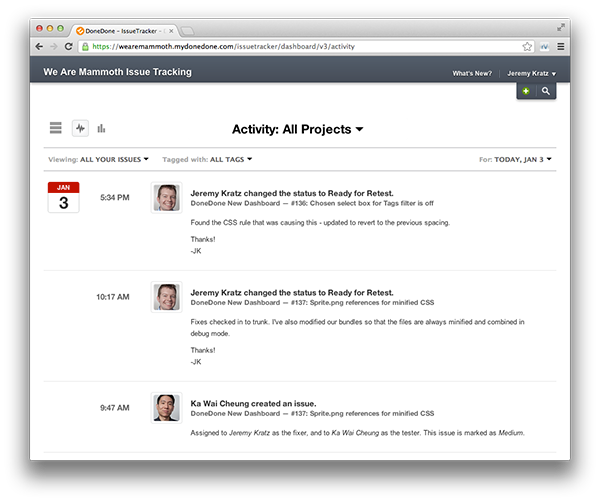
By default, the Activity Dashboard displays all updates that have happened today
Customize your results
You can quickly specify a custom date range in the dashboard header, as well as further refine your results with the Project, Filter, and Tag dropdowns – DoneDone gives you the flexibility to be as specific or as general as you need to be.
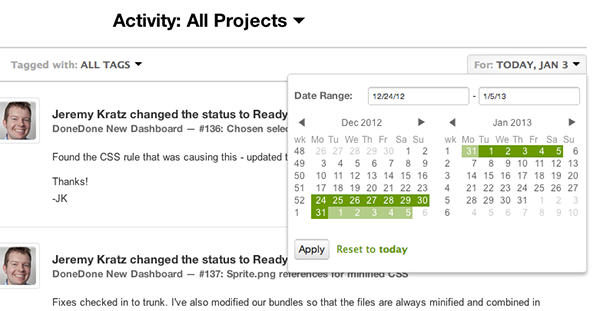
Use the dashboard header dropdowns to specify a date range or filter your results by project, status, tag, and more
Check in even when you’re out
The Activity Dashboard even includes a custom mobile view, which is great for keeping tabs on your work when you’re on the go (Learn more about DoneDone Mobile).
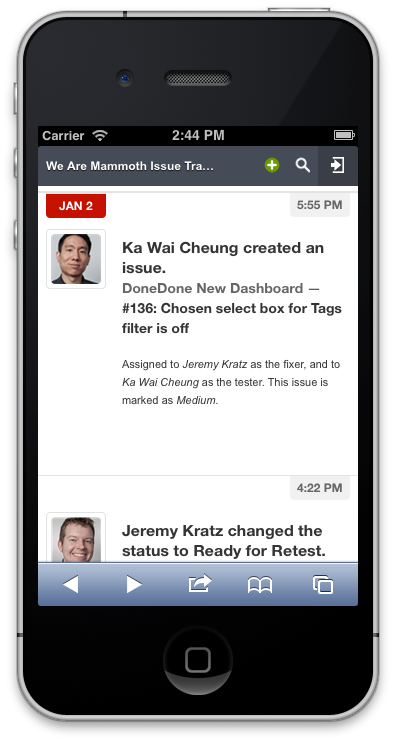
Quickly check for Activity updates using a mobile browser
Try it yourself
So the next time you get back from a well-deserved vacation, check out the DoneDone Activity Dashboard and see what you missed. Your coworkers will think you never left!Let us know how the New DoneDone is working for you – send us your feedback via email or Twitter (@getdonedone).
